Choosing qualitative data analysis software can become surprisingly complicated.
A student analyzing ten interviews does not need the same system as a university research team working with hundreds of transcripts, videos, survey responses, demographic variables, and multiple coders.
And having more features does not automatically make a qualitative analysis program better.
For many researchers, the more useful question is:
Which qualitative data analysis software is easiest to learn while still giving me the tools I actually need?
The short answer is that it depends on what you mean by “easy.”
If you want to upload qualitative files and quickly generate themes, quotes, sentiment patterns, comparisons, and structured reports without building a coding system manually from scratch, DataLumio is one of the simplest approaches.
If you specifically want traditional manual coding, Taguette is one of the simplest free options, while Quirkos and Delve offer relatively approachable manual workflows.
MAXQDA provides considerably more research depth while remaining more approachable than some enterprise-oriented systems. NVivo and ATLAS.ti offer extensive analytical capabilities, but that breadth also means there is more software to learn.
This guide compares those approaches so you can choose a qualitative data analysis program based on your actual research rather than simply choosing the tool with the longest feature list.
Quick Answer: What Is the Easiest Qualitative Data Analysis Software?
For researchers who want the fastest path from uploaded documents to structured qualitative findings, DataLumio is one of the easiest options because it uses an AI-guided, no-code workflow rather than requiring researchers to construct every code manually before seeing broader patterns. Its qualitative workflow can identify themes, supporting quotes, sentiment, theme occurrence, document-level patterns, word clouds, and conclusions from text-heavy research files.
Explore DataLumio’s qualitative data analysis software workflow.
For researchers specifically learning traditional manual coding:
- Taguette is one of the easiest completely free choices.
- Quirkos is strong for researchers who prefer visual coding.
- Delve focuses heavily on streamlined browser-based manual coding.
- Dedoose is useful when collaboration and mixed-methods work matter.
- MAXQDA provides a good balance between usability and advanced capabilities.
- ATLAS.ti is better suited to researchers who want extensive coding, AI, networking, and multimedia functionality.
- NVivo is particularly strong for complex and long-running research projects where advanced querying, mixed methods, multimedia, and detailed project organization justify a larger learning investment.
There is therefore no universally easiest software for qualitative data analysis. The right answer depends on whether your priority is speed, manual coding, methodological depth, collaboration, multimedia support, AI assistance, or cost.
What Makes Qualitative Data Analysis Software Easy to Learn?
Ease of use should not be measured only by how attractive a dashboard looks.
Good qualitative data software should reduce unnecessary steps between your research material and your analysis.
For a beginner, five things matter particularly:
1. Setup
Can you open the software and begin working immediately, or do you need to install desktop applications, configure projects, understand licensing, and complete tutorials first?
Browser-based systems normally remove some of this friction.
2. Importing Research Data
Researchers commonly work with:
- Interview transcripts
- Focus-group transcripts
- Open-ended survey responses
- Research documents
- PDFs
- Field notes
- Audio
- Video
- Images
- Mixed-methods datasets
The best program for qualitative data analysis should support the types of files your study actually contains.
3. Coding Workflow
Traditional qualitative data coding software normally asks researchers to select passages and associate them with codes.
Simple tools make that process resemble highlighting a document.
More advanced systems add hierarchical codebooks, cases, attributes, memos, queries, relationships, networks, matrices, intercoder analysis, and statistical features.
Those capabilities can be extremely valuable—but each one adds something else to learn.
4. Time to Useful Findings
Creating your first code is not necessarily the same as obtaining a useful research insight.
That distinction matters much more in 2026 because AI-assisted qualitative analysis can automate or accelerate parts of initial organization, categorization, summarization, and theme discovery.
Researchers still need to evaluate those outputs critically. AI assistance should accelerate research judgment rather than replace it.
5. Research Depth
The easiest program today can become frustrating later if your methodology requires functionality it does not provide.
That is why a dissertation using complex case classifications may need a different tool from an undergraduate thematic-analysis exercise.
How We Compared These Qualitative Analysis Programs
This comparison does not pretend that one workflow represents every researcher.
We evaluated the tools using their current product documentation, available pricing information, supported platforms, qualitative-analysis capabilities, learning resources, and practical workflow requirements.
We focused on:
- Setup and platform access
- Manual coding requirements
- AI assistance
- Research file support
- Coding depth
- Mixed-methods capabilities
- Collaboration
- Free or low-cost access
- Beginner usability
- Suitability for complex research
This distinction is important because an AI-guided analysis platform and traditional computer-assisted qualitative data analysis software—or CAQDAS—solve parts of the same research problem differently.
Easiest Qualitative Data Analysis Software: Quick Comparison
| Software | Learning Curve | Best For | Manual Coding | AI Assistance | Free Option |
|---|---|---|---|---|---|
| DataLumio | Low | Fast AI-guided qualitative analysis | Not required from scratch | Yes | Initial/free access available |
| Taguette | Low | Free basic qualitative coding | Yes | No | Yes |
| Quirkos | Low | Visual manual coding | Yes | Limited/varies by workflow | Trial |
| Delve | Low | Straightforward web-based coding | Yes | Some AI assistance | Trial |
| Dedoose | Moderate | Collaborative mixed methods | Yes | Limited compared with AI-native tools | No permanent free plan |
| MAXQDA | Moderate | Academic and mixed-methods research | Yes | Yes | Trial |
| ATLAS.ti | Moderate–High | Advanced qualitative research | Yes | Yes | Trial |
| NVivo | Moderate–High | Large and complex research projects | Yes | Yes | Trial/licensing varies |
The purpose of this table is not to declare that simpler always means better.
If learning curve isn’t your main concern, see our complete comparison of the best qualitative data analysis software for coding, interviews, mixed methods, and free use.
1. DataLumio
Easiest for AI-Guided Qualitative Analysis Without Complex Setup
DataLumio approaches qualitative analysis differently from traditional coding-first programs.
Instead of requiring users to manually create a complete code system before they can start identifying broader patterns, researchers can upload text-heavy research material and generate a structured qualitative analysis.
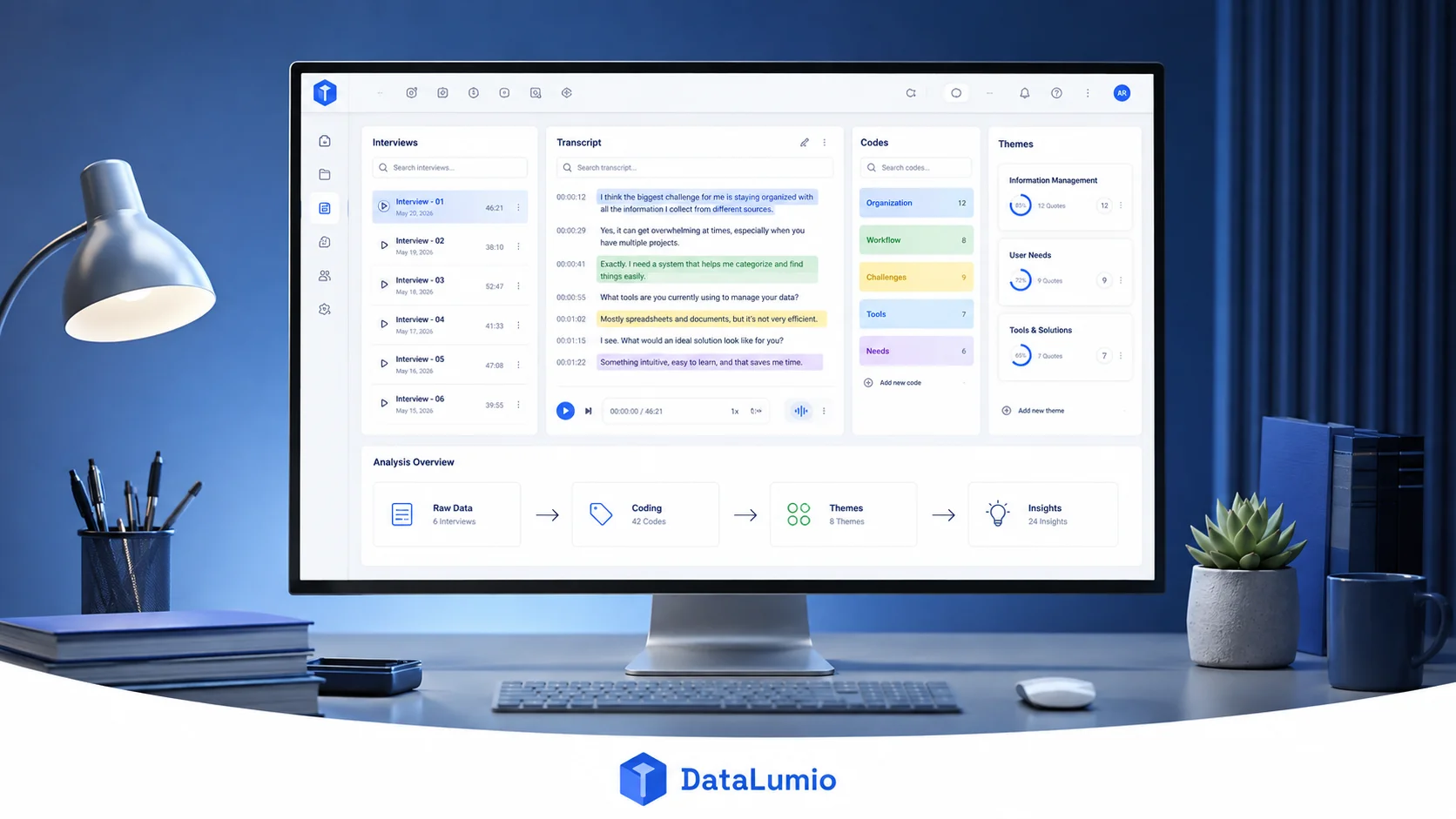
DataLumio currently supports qualitative workflows involving interviews, focus groups, open-ended responses, research notes, and other text-based material. Depending on the source material, its output can include themes, supporting quotations, sentiment labels, occurrence information, document comparisons, word clouds, and conclusions.
That makes it particularly useful for researchers asking:
“How can I understand the major patterns in these documents without spending days learning traditional QDA software first?”
Why DataLumio Is Easy to Start With
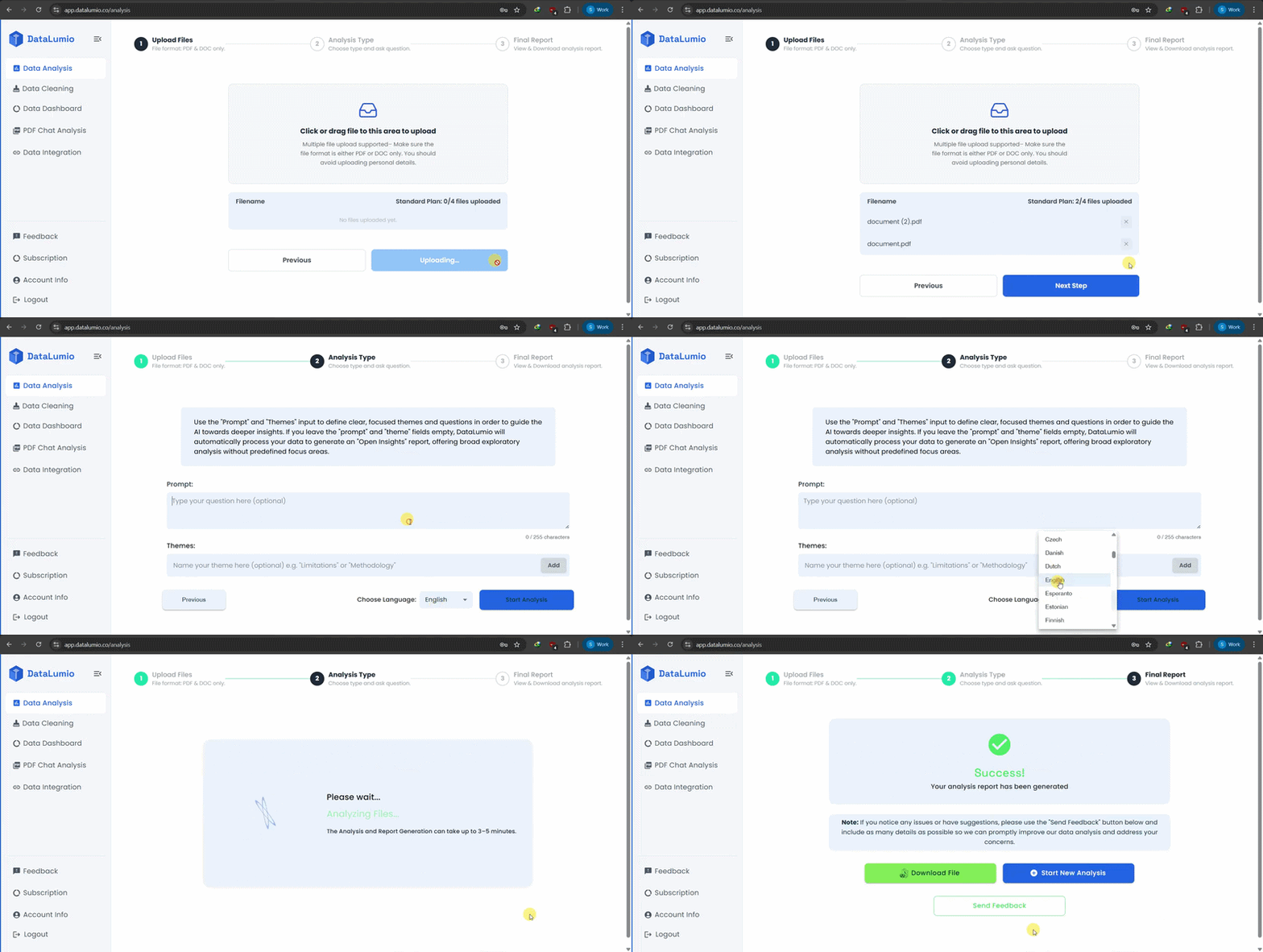
Its workflow is essentially:
- Upload your research files.
- Choose qualitative analysis.
- Provide a research focus or themes if needed.
- Run the analysis.
- Review the generated themes, quotes, patterns, and report.
- Validate the interpretation against your original material.
There is no coding language to learn, and the platform is designed around no-code analysis. DataLumio also supports quantitative analysis, data cleaning, PDF analysis, dashboards, and report-generation workflows on the broader platform.
Where DataLumio Fits Best
DataLumio is particularly suitable for:
- Interview analysis
- Open-ended survey analysis
- Focus-group transcripts
- Initial thematic exploration
- Customer feedback
- Research-document analysis
- Students who do not want to master enterprise QDA software
- Researchers working with both qualitative and quantitative data
You can see the broader workflow in the DataLumio demo. View the DataLumio demo
Where a Traditional QDA Package May Be Better
This distinction matters.
If your methodology requires extensive line-by-line manual coding, highly customized code hierarchies, detailed case classifications, sophisticated network modeling, or specialized audit workflows, a full traditional CAQDAS system such as NVivo, MAXQDA, or ATLAS.ti may still be the stronger fit.
Ease should not come at the expense of methodological requirements.
Best for: Researchers who prioritize a quick, no-code, AI-assisted route from qualitative files to structured findings.
2. Taguette
Easiest Free Qualitative Data Analysis Software for Basic Coding
If your biggest constraint is budget, Taguette deserves serious consideration.
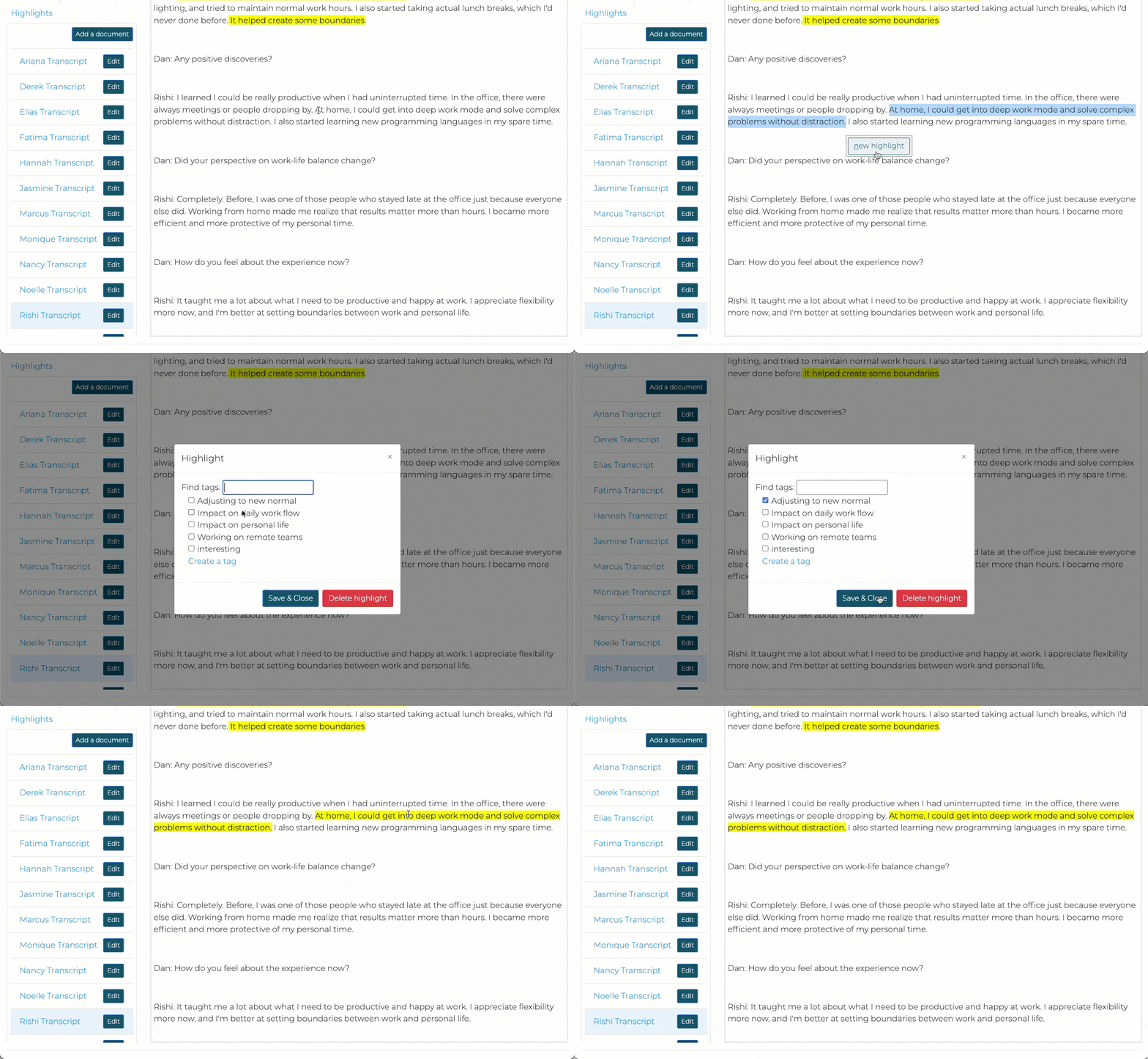
Taguette is a free and open-source qualitative data analysis tool that lets users import research documents, highlight relevant passages, associate them with tags, collaborate through hosted or self-hosted environments, and export project information.
Its workflow is close to using a highlighter on a printed transcript:
Select something important, attach a tag, and continue reading.
That simplicity makes Taguette particularly appealing to beginners.
What Taguette Supports
The project documentation lists support for formats including PDF, DOCX, TXT, HTML, EPUB, MOBI, ODT, and RTF. Researchers can also export their project, codes, highlights, documents, and related results.
Taguette can run through its hosted web environment or locally on macOS, Windows, and Linux.
Visit the official Taguette site. Taguette qualitative research software
Who Should Use Taguette?
Taguette makes sense for:
- Student assignments
- Small interview projects
- Basic thematic coding
- Researchers needing free qualitative coding software
- Researchers who value open-source software
- Projects where sophisticated analytics are unnecessary
However, researchers who eventually need deep mixed-methods analysis, elaborate visualization, extensive queries, or enterprise project management may outgrow it.
Best for: Researchers looking for genuinely free qualitative data analysis software with straightforward manual coding.
3. Quirkos
Easiest for Visual Qualitative Coding
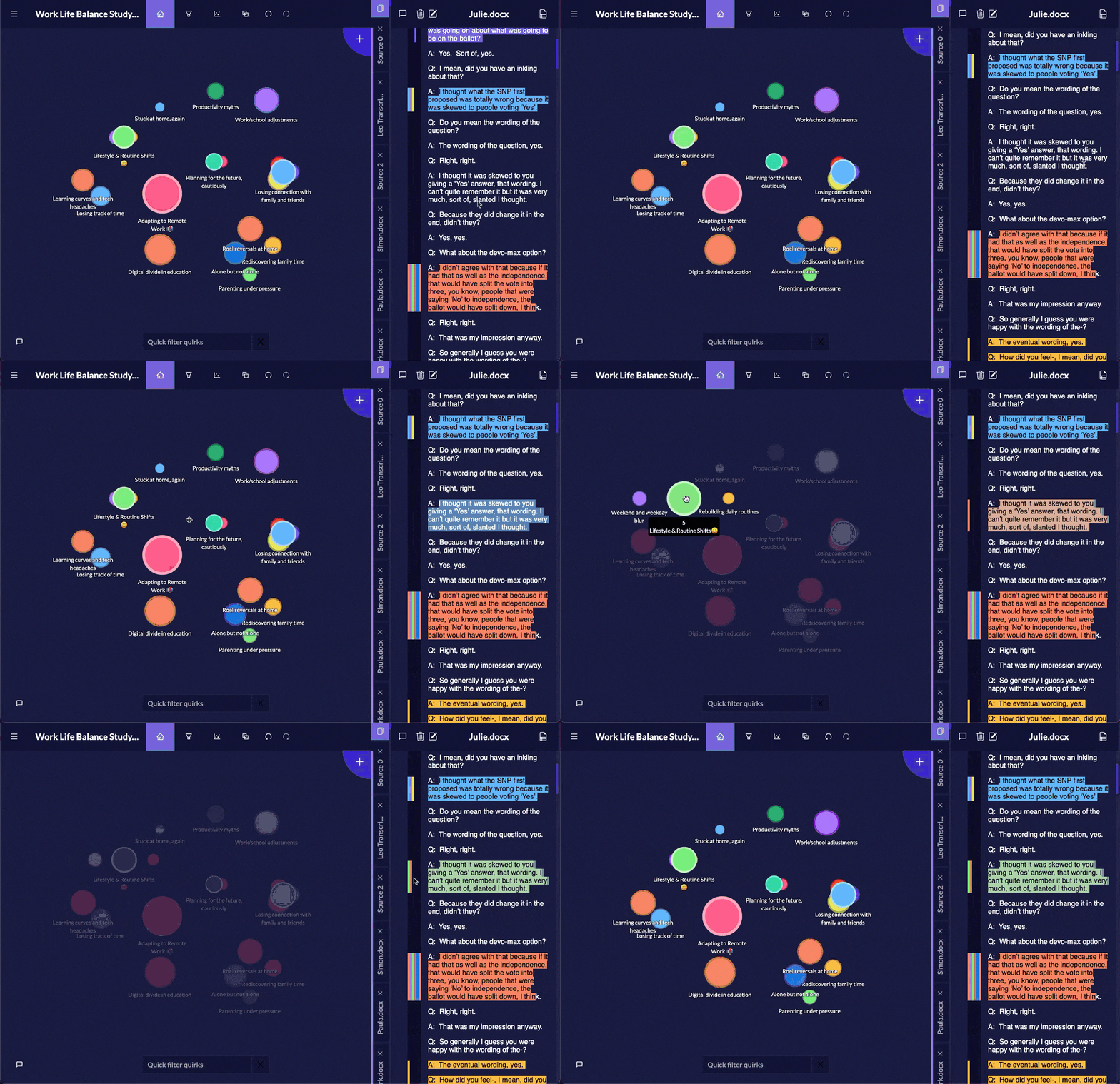
Quirkos takes a more visual approach to qualitative research.
Rather than presenting analysis primarily through dense menus and project trees, Quirkos emphasizes visual organization of themes and codes.
Its current offering includes cloud access, browser access, project sharing, live collaboration, automated transcription allowance on some plans, and an offline desktop option. Quirkos advertises cloud student subscriptions starting at $5 per month and an offline lifetime licence starting at $69 at the time of this review.
See current Quirkos information and pricing. Visit Quirkos
Why Beginners Like Visual Coding
Some researchers struggle with traditional code trees because they cannot easily see how the analysis is developing.
Visual representations make theme prominence and relationships easier to inspect.
That can make Quirkos especially useful for:
- Visual learners
- First-time qualitative researchers
- Thematic-analysis projects
- Smaller research projects
- Students learning coding concepts
Its simplicity is an advantage when sophisticated enterprise functionality is unnecessary.
Best for: Researchers who want accessible, visual qualitative analysis tools instead of an enterprise-style interface.
4. Delve
Easiest for Traditional Browser-Based Manual Coding
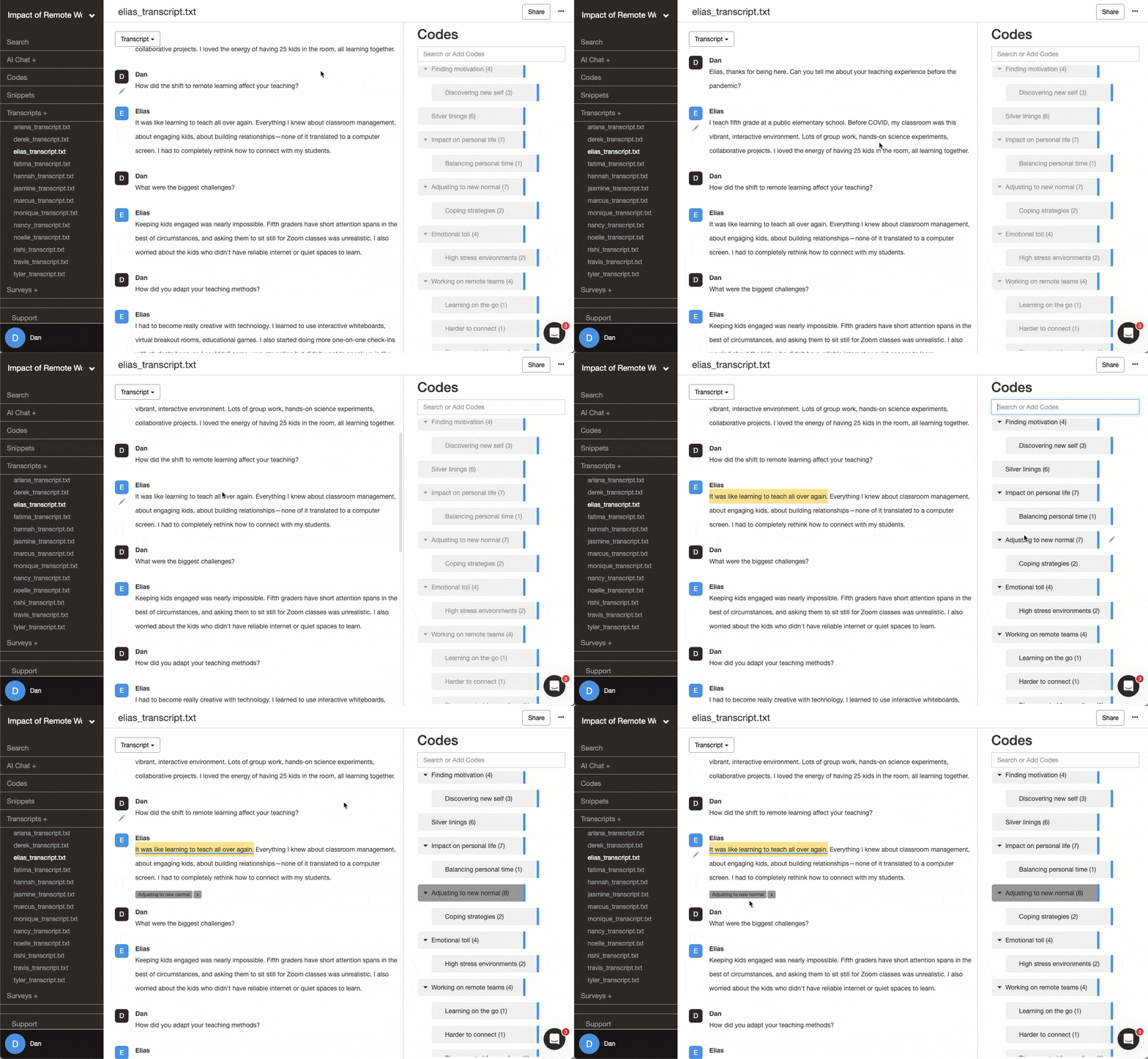
Delve is designed around a focused qualitative coding workflow.
Its current comparison material emphasizes a browser-based interface that allows users to upload transcripts, highlight passages, apply codes, search material, and organize coding without navigating the number of panels associated with some older QDA platforms.
That makes Delve attractive to:
- Dissertation students
- Beginner qualitative researchers
- Interview studies
- Focus groups
- Thematic analysis
- Researchers who specifically want manual coding rather than automated first-pass analysis
Its biggest strength is that it reduces the interface complexity surrounding traditional coding.
Its limitation is essentially the reverse: researchers who eventually require the deepest enterprise capabilities may find larger QDA ecosystems more suitable.
Best for: Researchers who want traditional qualitative coding with a relatively streamlined learning curve.
5. Dedoose
Best Beginner Option for Collaborative Mixed-Methods Research
Dedoose becomes interesting when your project combines qualitative codes with structured variables.
For example, imagine that you interview 60 participants but also have information about their:
- Age
- Location
- Income
- Study group
- Intervention
- Customer segment
- Survey scores
A mixed-methods platform can help you compare qualitative patterns against those attributes.
Dedoose provides collaboration, permissions, qualitative and mixed-methods functionality, with student pricing currently listed at $12.95 per active month and individual pricing at $17.95 per active month.
View current Dedoose pricing. Dedoose pricing and plans
Dedoose therefore occupies a useful middle ground.
It is more specialized than a basic free coding program, but considerably less intimidating financially than some traditional enterprise systems.
Best for: Small research teams and students who need collaborative qualitative and quantitative analysis.
6. MAXQDA
Best Balance Between Usability and Advanced Research Features
When researchers are debating NVivo or MAXQDA, usability is often one of the deciding factors.
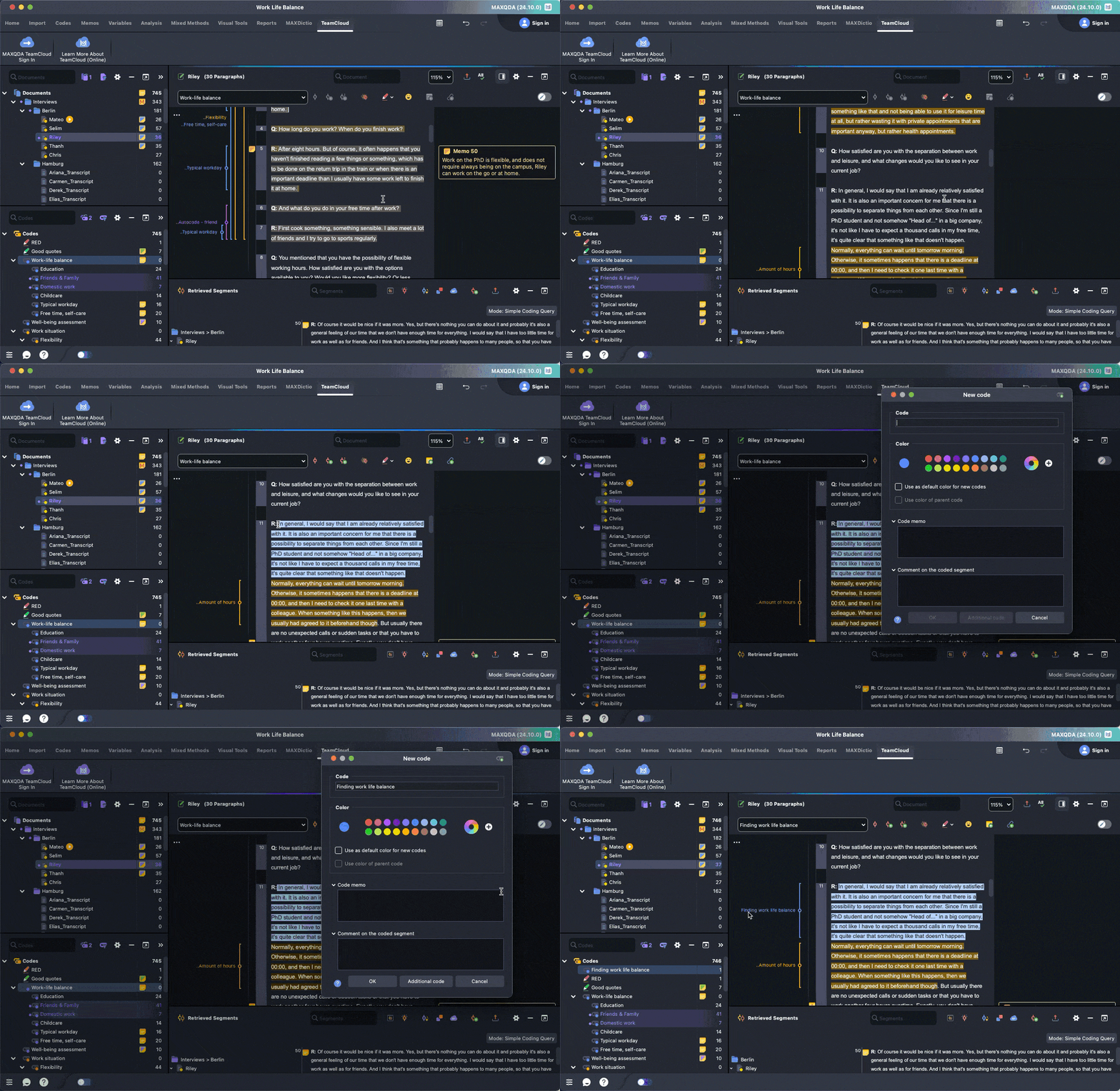
MAXQDA supports qualitative research, mixed methods, multimedia analysis, visualization, questionnaire analysis, literature review, statistical analysis through its broader product ecosystem, transcription, and AI-assisted workflows.
The software also provides tutorials, manuals, workshops, courses, and a free trial.
Visit MAXQDA. MAXQDA qualitative data analysis software
MAXQDA vs NVivo for Beginners
If your choice is specifically MAXQDA vs NVivo, MAXQDA is often worth testing first when interface accessibility is a priority.
NVivo remains extraordinarily capable, but its larger research environment requires users to understand more concepts.
MAXQDA still has a learning curve because it is a professional research platform. You are not simply learning how to highlight text; you are learning a research-analysis system.
The advantage is that you are less likely to outgrow it when your project becomes more complex.
Best for: Researchers who want advanced qualitative and mixed-methods functionality without immediately jumping to the most complex research environment.
7. ATLAS.ti
Best for Advanced Qualitative Analysis With Strong AI Support
ATLAS.ti is another major name among computer programs for qualitative data analysis.
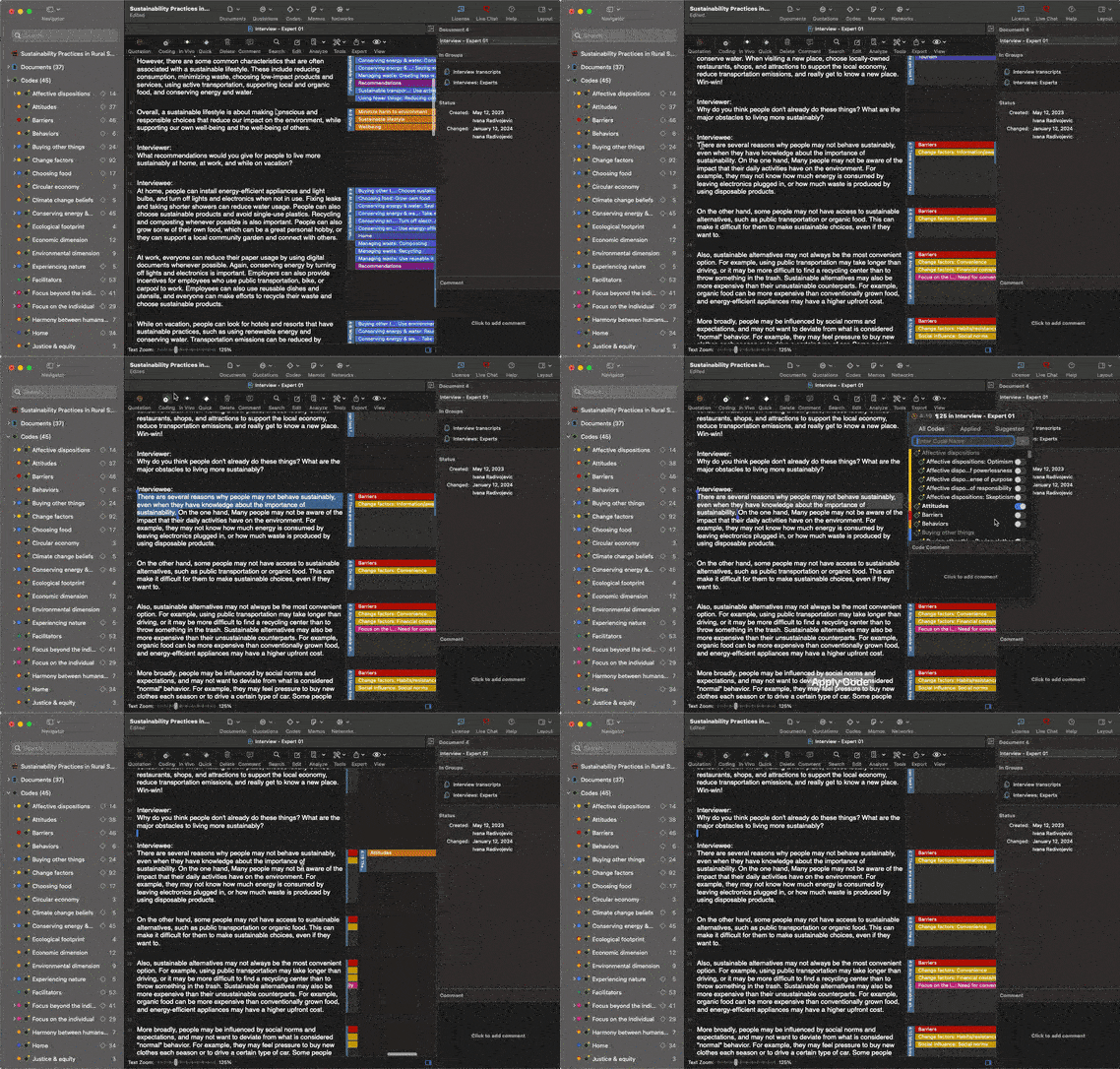
Its current platform supports Windows, macOS, and browser-based access. It can handle documents, PDFs, images, audio, video, social-media data, surveys, reference-manager information, and other qualitative sources.
ATLAS.ti has also invested heavily in AI functionality, including AI coding and conversational features.
Visit the ATLAS.ti platform. ATLAS.ti qualitative analysis software
NVivo or ATLAS.ti?
The NVivo or ATLAS.ti question should not be reduced to which interface looks easier.
Choose based on:
- Your methodology
- Your university’s existing licences
- Collaboration requirements
- Data types
- AI preferences
- Required queries
- Visualization
- Existing researcher experience
- Export requirements
ATLAS.ti offers considerably more functionality than a simple coding application, so beginners should expect to invest time learning it.
That investment becomes worthwhile when the project actually needs the additional analytical power.
Best for: Researchers conducting complex qualitative projects who want advanced coding plus contemporary AI tools.
8. NVivo
Best for Complex, Long-Term and Institutionally Supported Research
NVivo remains one of the most established names in qualitative research computer software.
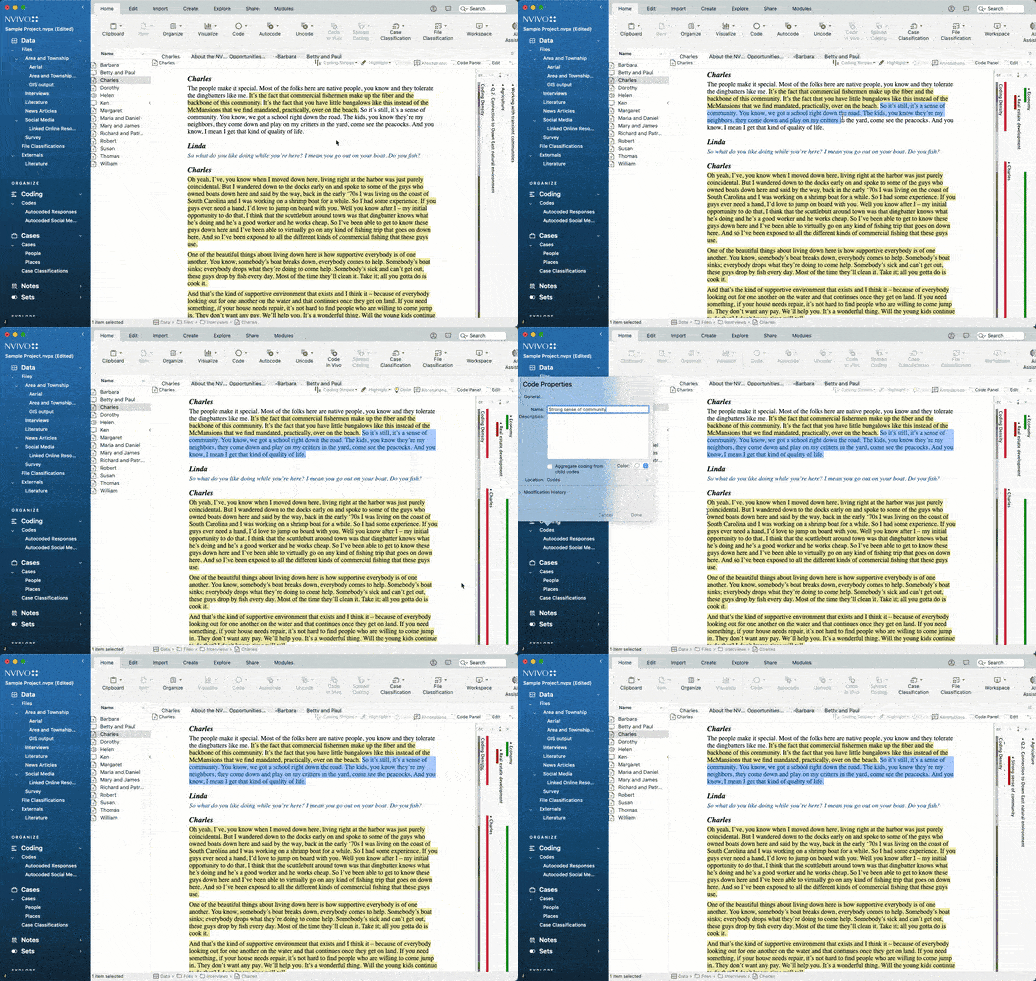
Lumivero describes the platform as supporting documents, transcripts, surveys, audio, video, coding, cases, attributes, queries, visualization, mixed methods, AI assistance, collaboration, and multiple qualitative methodologies.
It is also built around research environments where maintaining structured, defensible analysis is more important than minimizing every click.
Visit NVivo. NVivo qualitative data analysis software
Is NVivo Hard to Learn?
Even NVivo’s current documentation acknowledges that a professional research platform takes time to learn. Lumivero says basic workflows may become comfortable after several sessions or hours, while solid knowledge of the main features commonly develops after active use over roughly one to two weeks.
That does not make NVivo bad software.
It means the software is designed for depth rather than minimalism.
If your study runs for two years, requires large multimedia datasets, advanced queries, case attributes, mixed methods, collaboration, and detailed reporting, spending time learning the system may be entirely rational.
If you have five interviews and a deadline next week, it may be unnecessary overhead.
Best for: Large academic, government, health, institutional, and complex research projects where analytical depth is more important than immediate simplicity.
What About Free Qualitative Data Analysis Software?
Researchers searching for software for qualitative data analysis free usually fall into two groups.
The first genuinely needs open-source or permanently free software.
The second wants to test qualitative analysis before purchasing anything.
For permanently free manual coding, Taguette remains one of the strongest beginner choices. It is open-source and explicitly free to use.
Other free and open-source options in the broader category include tools such as QualCoder and specialized research programs, although their setup requirements and features differ considerably.
Paid platforms frequently provide trials or starter access as well. A trial can be more useful than choosing software only from screenshots because QDA usability is extremely personal.
Test the same transcript in two or three platforms.
You will quickly discover which workflow feels natural.
Free QDA Software vs Paid QDA Software
Free software is not automatically worse.
The real difference usually appears as the research becomes more demanding.
Free qualitative coding software may be completely sufficient when you need:
- Highlighting
- Basic coding
- Code retrieval
- Simple exports
- Small projects
A more advanced paid qualitative research analysis software package becomes easier to justify when you need:
- Large projects
- Multiple researchers
- Multimedia
- Advanced code relationships
- AI assistance
- Case classifications
- Statistical integration
- Complex queries
- Professional reporting
- Intercoder analysis
- Institutional support
Do not pay for features you will never use.
But do not save $100 on software only to create 50 hours of unnecessary manual work.
NVivo vs MAXQDA: Which Is Easier?
For users comparing NVivo vs MAXQDA, MAXQDA is generally the one I would test first if your main concern is learning curve.
That is not the same as saying MAXQDA is universally better.
NVivo offers an extensive research environment and remains highly suitable for complex studies. Its current platform supports advanced coding, queries, mixed methods, AI-assisted functionality and visualization.
MAXQDA also provides substantial qualitative and mixed-methods capabilities while emphasizing an integrated interface, training ecosystem, statistical analysis, transcription and AI options.
The practical decision is:
Choose MAXQDA when you want strong qualitative and mixed-methods capabilities and place high value on usability.
Choose NVivo when your research requirements, institution, collaborators, methodology, or existing workflow benefit from NVivo’s ecosystem and deeper project structure.
For a broader comparison of the market, read DataLumio’s guide to the best software for qualitative data analysis.
Which Qualitative Data Analysis Tool Should You Choose?
The best choice becomes easier when you stop asking which program has the most features.
Ask what your project actually requires.
1. Choose DataLumio When:
- You want AI-assisted qualitative analysis.
- You do not want to manually build the entire analysis from scratch.
- You work mainly with interviews, open-text responses, documents, or similar textual research.
- You want structured themes, supporting quotes and reports.
- You also work with quantitative data, PDFs, cleaning or dashboards.
DataLumio’s current Starter option is listed at $5 as a one-time credit purchase, while its monthly Standard plan starts at $10.
View DataLumio pricing. DataLumio pricing
2. Choose Taguette When:
- Your budget is zero.
- Your project is relatively small.
- You need straightforward manual coding.
- Open-source software matters to you.
3. Choose Quirkos When:
- You prefer visual analysis.
- You are learning qualitative coding.
- You want a lightweight manual workflow.
4. Choose Delve When:
- You want browser-based manual coding.
- You are doing thematic analysis.
- You prefer a focused interface.
5. Choose Dedoose When:
- Your study mixes qualitative and quantitative information.
- Multiple researchers need to collaborate.
- Participant attributes matter to your analysis.
6. Choose MAXQDA When:
- You need strong qualitative and mixed-methods functionality.
- You want a professional research environment.
- You want more depth than lightweight coding tools provide.
7. Choose ATLAS.ti When:
- You have complicated qualitative datasets.
- You value advanced coding structures and visualization.
- AI-assisted coding is important.
- Your project involves several media formats.
8. Choose NVivo When:
- Your project is large or long term.
- Your institution already uses NVivo.
- You require advanced queries and classifications.
- Multimedia analysis matters.
- Your methodology needs detailed research infrastructure.
The Biggest Mistake Researchers Make When Choosing QDA Software
The most common mistake is choosing software based on reputation rather than research requirements.
A PhD student hears that researchers use NVivo, so they buy NVivo.
A colleague recommends MAXQDA, so another researcher buys MAXQDA.
Someone discovers free QDA software and chooses it purely because it costs nothing.
None of those are proper selection criteria.
Before selecting any data analysis software for qualitative research, write down:
- How much data you have.
- Which file types you will analyze.
- Whether coding must be manual.
- Which qualitative methodology you are following.
- Whether you have multiple coders.
- Whether you need intercoder agreement.
- Whether quantitative variables are involved.
- Whether AI assistance is permitted.
- What your institution requires.
- How your findings must be exported or audited.
Then choose the simplest software that satisfies those requirements.
That is very different from choosing the simplest software available.
Does Easier Qualitative Software Mean Lower-Quality Research?
No.
Qualitative research quality does not increase because an interface has more buttons.
Strong qualitative research depends on issues such as:
- Appropriate research design
- Careful data collection
- Systematic analysis
- Researcher reflexivity
- Transparent methodological decisions
- Appropriate interpretation
- Evidence supporting conclusions
- Traceability back to source material
Software can support those practices.
It cannot perform researcher judgment for you.
That is especially important when using AI-assisted qualitative data analysis tools. AI-generated interpretations should be checked against original documents rather than accepted automatically. DataLumio itself explicitly advises users to review AI-generated interpretation before formal use.
Is AI Changing Qualitative Data Analysis Software?
Yes.
Traditional qualitative software was built primarily around researcher-driven manual coding.
AI now allows software to assist with tasks such as:
- Summarization
- Preliminary coding
- Theme identification
- Sentiment analysis
- Searching large document collections
- Comparing documents
- Suggesting code structures
- Extracting supporting evidence
NVivo now includes an AI Assistant and AI-supported coding workflows.
ATLAS.ti currently promotes AI Coding and conversational AI functionality.
MAXQDA provides AI Assist alongside its conventional research environment.
DataLumio approaches the problem from the opposite direction by making AI-guided analysis central to its no-code workflow.
This shift is part of a broader move from traditional workflows toward AI-assisted data analysis.
In the past, ease mostly meant fewer clicks while manually coding.
Today, researchers also need to ask:
How much of the mechanical analysis workflow should the software help me complete?
Final Verdict: What Is the Easiest QDA Software to Learn?
There is no single winner for every researcher.
DataLumio is one of the easiest options when your goal is to move from qualitative documents to AI-assisted themes, quotes, patterns, and structured findings without first mastering a traditional coding environment.
Taguette is one of the strongest choices for completely free, straightforward manual coding.
Quirkos works well for visual learners.
Delve is suited to researchers who want a streamlined traditional coding experience in the browser.
Dedoose makes more sense when collaboration and mixed-methods variables are important.
MAXQDA provides a strong balance between usability and professional research capabilities.
ATLAS.ti and NVivo become more compelling as research complexity grows and advanced functionality becomes more valuable than immediate simplicity.
The right qualitative analysis software is therefore not necessarily the program you can learn fastest.
It is the program that lets you complete your research rigorously while spending the least unnecessary time managing software.
If you are comparing the entire market rather than learning curve alone, see DataLumio’s full qualitative data analysis software comparison.
If you want to try an AI-guided approach first, explore DataLumio’s AI tools for data analysis.
Frequently Asked Questions
What is the easiest qualitative data analysis software for beginners?
DataLumio is one of the easiest options for researchers who want AI-guided qualitative findings without building an entire coding system manually. For traditional manual coding, Taguette, Quirkos and Delve provide comparatively approachable workflows.
What is the best free qualitative data analysis software?
Taguette is one of the strongest permanently free options for basic qualitative coding. It is open-source, supports multiple document formats and can be used through a hosted server or installed locally.
Is there free qualitative coding software?
Yes. Taguette is a free open-source qualitative coding tool. Other open-source qualitative analysis programs are also available, although they vary considerably in usability and capabilities.
Which is easier, NVivo or MAXQDA?
Researchers prioritizing ease of use should generally test MAXQDA alongside NVivo before committing. Both are professional research environments, however, so neither should be judged solely by how quickly a beginner can create the first code.
NVivo or MAXQDA: which is better?
Choose based on methodology and project requirements. MAXQDA is particularly attractive for mixed-methods researchers seeking a balanced workflow, while NVivo is suited to projects that benefit from extensive coding, querying, case structures, multimedia analysis and institutional research infrastructure.
NVivo or ATLAS.ti: which should I choose?
ATLAS.ti is worth considering when AI coding, network-style analysis and cross-platform access matter. NVivo is worth considering when complex project structures, queries, cases and an established academic research ecosystem are priorities. Both are significantly more feature-rich than simple coding tools.
Can I use qualitative analysis software for thematic analysis?
Yes. Most major qualitative research software can support thematic analysis. The software helps organize and retrieve coded material, but researchers remain responsible for developing and interpreting meaningful themes.
What software is used for qualitative research?
Common qualitative research software includes NVivo, MAXQDA, ATLAS.ti, Dedoose, Quirkos, Delve, Taguette and newer AI-assisted platforms such as DataLumio. The appropriate choice depends on methodology, data volume, budget and desired workflow.
Do I need qualitative software for a dissertation?
Not necessarily. Very small projects can technically be analyzed using Word, spreadsheets or manual methods. Dedicated qualitative research coding software, however, can make larger projects easier to organize, retrieve, compare and document.
Can AI replace manual qualitative coding?
AI can accelerate parts of coding, theme discovery, summarization and document comparison, but it should not eliminate researcher judgment. Whether manual coding itself is methodologically required depends on your research design.
What should I look for in a qualitative data analysis tool?
Prioritize compatibility with your methodology, data types, coding requirements, collaboration needs, project size, export requirements, AI policy, privacy requirements and budget. Do not select software based only on feature count.
Which qualitative software is best for students?
Students doing small projects may prefer Taguette, Quirkos or Delve. Students wanting AI-guided analysis can consider DataLumio, while dissertation or doctoral researchers needing extensive manual coding and mixed-methods capabilities should also evaluate MAXQDA, ATLAS.ti and NVivo.
Where can I compare more qualitative data analysis programs?
DataLumio maintains a broader comparison covering major qualitative data analysis softwares, including traditional, cloud-based and emerging options.